
When you sign up for ThreeBIT Admin-as-a-Service, you are handing over the day-to-day management of your IT environment to a dedicated team — and we take that responsibility seriously. Our onboarding process is designed to be low-disruption: we work around your schedule, communicate at every stage, and aim to have your team fully covered without any productivity downtime.
The onboarding journey
The diagram below gives you a schematic view of the five phases we move through together, from initial discovery all the way to live managed support.
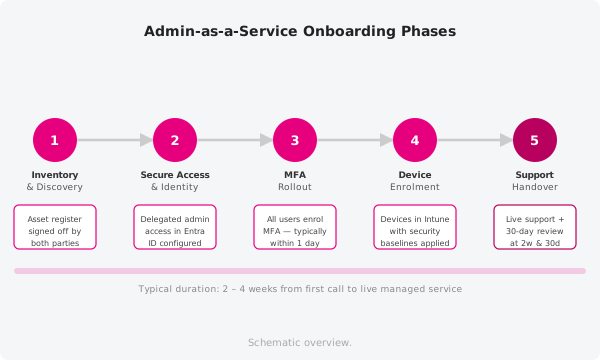
Schematic overview.
1. Inventory and discovery
Before we can manage anything, we need to understand what you already have. In this first phase a ThreeBIT engineer sits down with you (usually via a short video call and a shared questionnaire) to map out every system, cloud account, software licence, and user that falls within scope. You do not need to prepare a perfect list — we guide you through it. The output of this phase is a signed-off asset register that becomes the foundation for everything that follows.
2. Secure access and identity
With the inventory complete, we configure our admin access in a way that is auditable and reversible. We work within your existing identity platform (typically Microsoft Entra ID / Azure AD) and never share credentials or use personal accounts for administrative tasks. You will be asked to grant us a specific set of delegated permissions; we will walk you through exactly what each permission does and why it is needed before you confirm anything.
3. Multi-factor authentication rollout
Weak or missing authentication is one of the most common entry points for security incidents. During this phase we enable and enforce multi-factor authentication (MFA) across your entire user base. We handle the technical configuration, send your team a short plain-language guide explaining what they will see and what to do, and are on hand to answer questions as people set up their authenticator apps. Most teams complete MFA enrolment within a single working day.
4. Device enrolment
Once identity is secured, we turn to the devices your team uses day to day. We enrol every in-scope laptop, desktop, and mobile device into a managed device policy (Microsoft Intune or an equivalent platform). This lets us push security baselines, enforce encryption, and deploy software updates centrally — without your staff having to do anything beyond approving a prompt on their screen. New devices purchased going forward are automatically enrolled as part of the standard setup process.
5. Support handover and first 30 days
With systems secured and devices managed, we formally take over responsibility for your IT operations. Your team receives the contact details for all support channels (see below), and we confirm the escalation paths for urgent issues. The first 30 days are treated as a stabilisation window: we monitor closely, respond quickly to any teething issues, and meet with you at the two-week and 30-day marks to review how things are going. After that, we move into our regular managed service rhythm.
Your support channels
Once onboarding is complete, your team can reach ThreeBIT through three channels:
- Support form — for non-urgent requests, submit a ticket through the support form on this help centre. A technician will pick it up during business hours and keep you updated by email.
- Help centre — this site contains step-by-step guides for the most common tasks. Search for your topic or browse by category before raising a ticket.
- Helpdesk phone line — our 24/7 phone helpdesk is operated by a specialist external service that triages your call and escalates to a ThreeBIT technician based in Germany for anything that requires hands-on attention. This is not an internal night-shift — it is a professional out-of-hours service purpose-built for exactly this kind of escalation.
Need a hand?
If you have questions about where you are in the onboarding process, use the support form and we will get back to you promptly.